

🇨🇦 Proudly Canadian 🛡 Transparent. Ethical. Client-Owned. 🏆 10+ years in business

CUSTOM SOFTWARE INTEGRATIONS

Connect The Systems. Remove The Manual Gaps.

Build purpose-made connections between the systems, data and workflows your business already relies on — so information moves where it is needed and repetitive work becomes easier to manage.

Built Around Your Workflow

Design the integration around how the business actually operates.

Keep Information Moving

Move useful records and updates between connected systems where supported.

Trigger The Right Action

Turn defined events into clear, repeatable workflow actions.

Connect What Matters

Scope specialized integrations around the systems the business needs to keep working together.
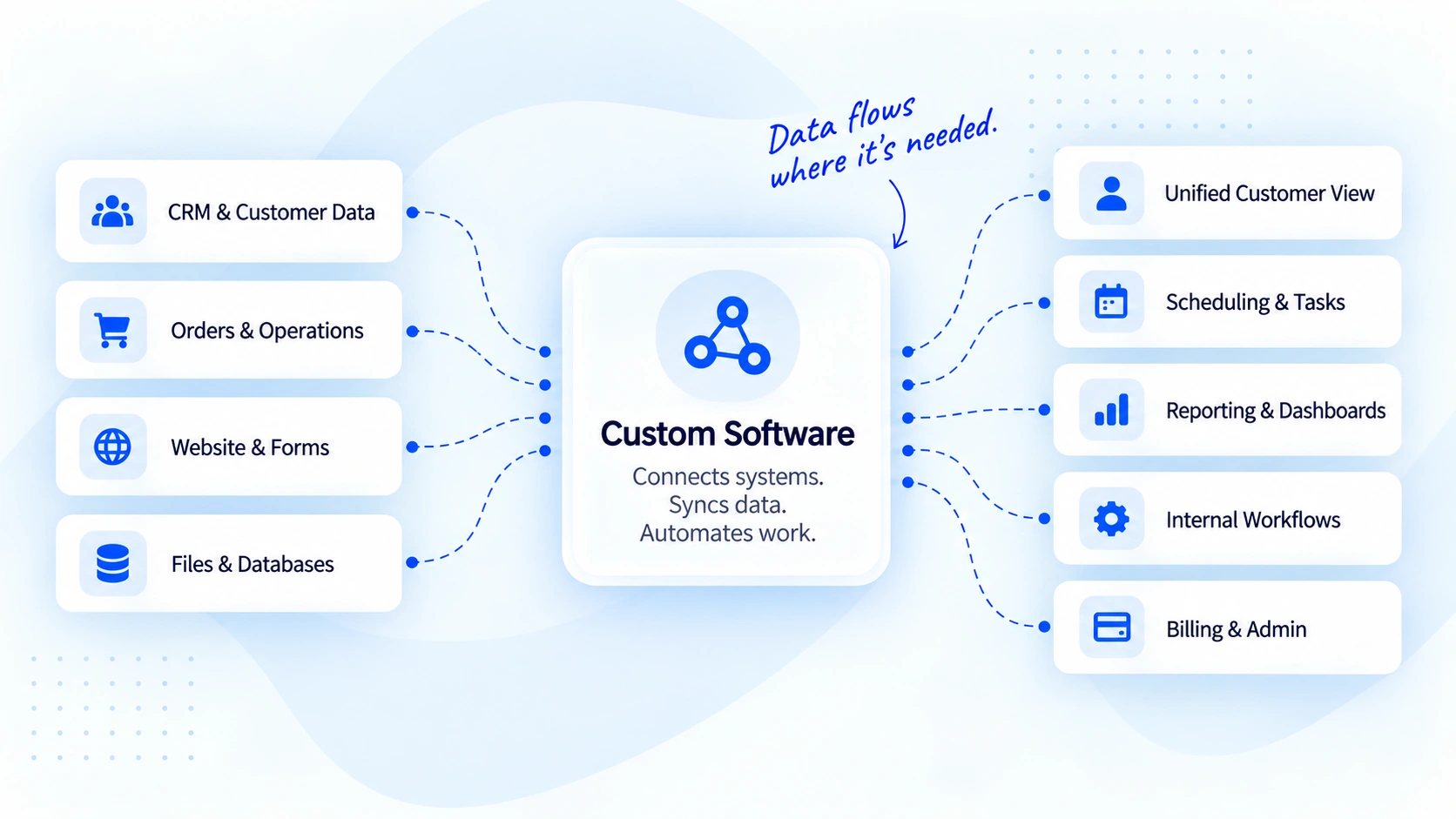
CONNECTED SOFTWARE WORKFLOWS

Connect The Systems Around The Work.

Bring customer data, operational events, website inputs and business records into purpose-built software that can route information into the workflows, dashboards and actions that need it.
Custom Software integration diagram showing CRM and customer data, orders, website forms, files and databases flowing into custom software, then connecting to customer views, scheduling, reporting, internal workflows, and billing systems.

CUSTOM SOFTWARE CONNECTIONS

Connect The Systems Your Business Already Depends On.

Build the connections around the actual operating model — from customer information and website forms to operations, data, tasks and reporting.

Keep Customer Context Connected

Move approved customer, lead and account information into the workflows that need it.

Turn Events Into Operational Actions

Connect business events to the internal steps, records or status changes that should follow.

Move Website Inputs Into The Workflow

Turn form submissions and website activity into structured information for the right internal process.

Connect The Data Behind The Work

Map, validate and move structured information between approved data sources where required.

Keep The Next Action Moving

Create clearer task, assignment and scheduling workflows around meaningful business events.

Put Operational Data Where It Helps

Bring selected data together for dashboards, administration and management visibility.

CRM & CUSTOMER DATA

Keep Customer Information Connected To The Work.

Map the customer and account information your workflow actually needs, then carry updates into the appropriate business application or internal process.
CD Customer Data Flow
Configured Connection
Source Record

Customer information

ET

Emma Thompson

Thompson Design Group
Email emma@company.com
Customer type Business
Status Qualified
Mapped Outcome

Customer context stays usable

Name Mapped
Company Mapped
Status Mapped
Next workflow Customer Operations
New customer event selected — create the mapped record in the custom workflow.
OP Operational Event
Workflow Defined
Business Event Order status changes
A meaningful operational event enters the workflow.
→
Custom Software Apply workflow logic
Validate the event, map the data and determine the next action.
New order selected — route the order into the configured operational workflow.
→
Outcome Operational action
Update a record, assign work or prepare the next internal step.
Workflow result ready for the connected operation.

ORDERS & OPERATIONS

Turn A Business Event Into The Next Action.

Use operational events as clear workflow triggers — routing information, updating records or preparing the next internal action without relying on repeated manual handoffs.

WEBSITE & FORMS

Let Website Activity Reach The Right System.

Take useful information from forms, enquiries or website workflows and move it into the internal system or process that should handle it next.
WF Website Input
Mapped Workflow
Website Event

Select the input workflow

Name Alex Morgan
Email alex@example.com
Request type New Enquiry
Internal Handoff

Website data becomes usable

Validation Passed
Fields Mapped
Destination Internal Workflow
Lead form selected — carry the enquiry fields into the mapped internal workflow.
DB Data Connection
Validation Required
Data Workflow

Move structured information safely

Import selected — bring the approved dataset into the mapping workflow.
Mapping Preview

Source → destination

customer_id Customer ID
account_name Company
status Workflow State
updated_at Last Updated
Required mappings are ready for review.

FILES & DATABASES

Make Business Data Easier To Use.

Structure the movement of approved data between files, databases and custom applications with clear mapping and validation before information enters the operational workflow.

TASKS & SCHEDULING

Keep The Next Step Attached To The Event.

Turn meaningful workflow events into tasks, assignments or scheduling actions so teams have a clearer next step without rebuilding the context manually.
TS Task & Scheduling Flow
Business Rule
Trigger

Qualified project request

Customer Northstar Digital
Request Integration Review
Priority Normal
Choose next action
Workflow Output

Keep the next step attached

Owner Integration Team
Task Review requirements
Context Attached
Create review task selected — ready for confirmation.
BI Business View
Configured Reporting
Dashboard View

Choose what the team needs to see

Operations view selected — show workflow volume, pending actions and operational status.
Operational Snapshot

Selected business signals

Open workflow items 18
Awaiting action 6
Completed today 12
Last refresh Current view
Operational context is ready for the selected dashboard view.

REPORTING & ADMIN

Bring Operational Data Into A Clearer View.

Connect the information decision-makers need into purpose-built dashboards and administrative views without forcing every team to work directly inside the source system.

CONTROLLED INTEGRATION PROCESS

Connect The System. Keep The Workflow Clear.

Start with the business process, define what needs to move, build the connection and verify the result before relying on automation.
Define Understand the workflow
and required outcome.
Map Define what information
needs to move.
Connect Build the approved
workflow connection.
Verify Test the result and
confirm the right action.

Insights

Ideas for clearer growth decisions.

Explore the SaaS platforms, developer infrastructure and delivery products created by Geeks of Cybernet.

Strategy

The five signals that tell you a growth system needs attention.

Purpose-built applications and workflows shaped around the business.

Search

Visibility is a business problem before it is a rankings problem.

Purpose-built applications and workflows shaped around the business.

Responsible AI

Where automation helps—and where a person should stay involved.

Purpose-built applications and workflows shaped around the business.

CUSTOM SOFTWARE INTEGRATIONS

Connect The Work Without Rebuilding Everything Around It.

Tell us which systems need to work together and what should happen between them. We’ll help define a practical integration path around the business.