

🇨🇦 Proudly Canadian 🛡 Transparent. Ethical. Client-Owned. 🏆 10+ years in business

GOC AI HELPDESK INTEGRATIONS

Connect The Context. Keep Support Moving.

Connect the systems that help your team understand the customer, answer accurately and move the ticket forward — without separating the conversation from the information behind it.

Keep Support Email Connected

Bring real support addresses into the shared Helpdesk workflow.

See What The Customer Ordered

Use supported store data to bring relevant order information into the ticket.

Ground Replies In Trusted Facts

Import and approve business knowledge before AI uses it in customer replies.

Keep People In Control

Use confidence thresholds and review queues when AI-generated replies need approval.
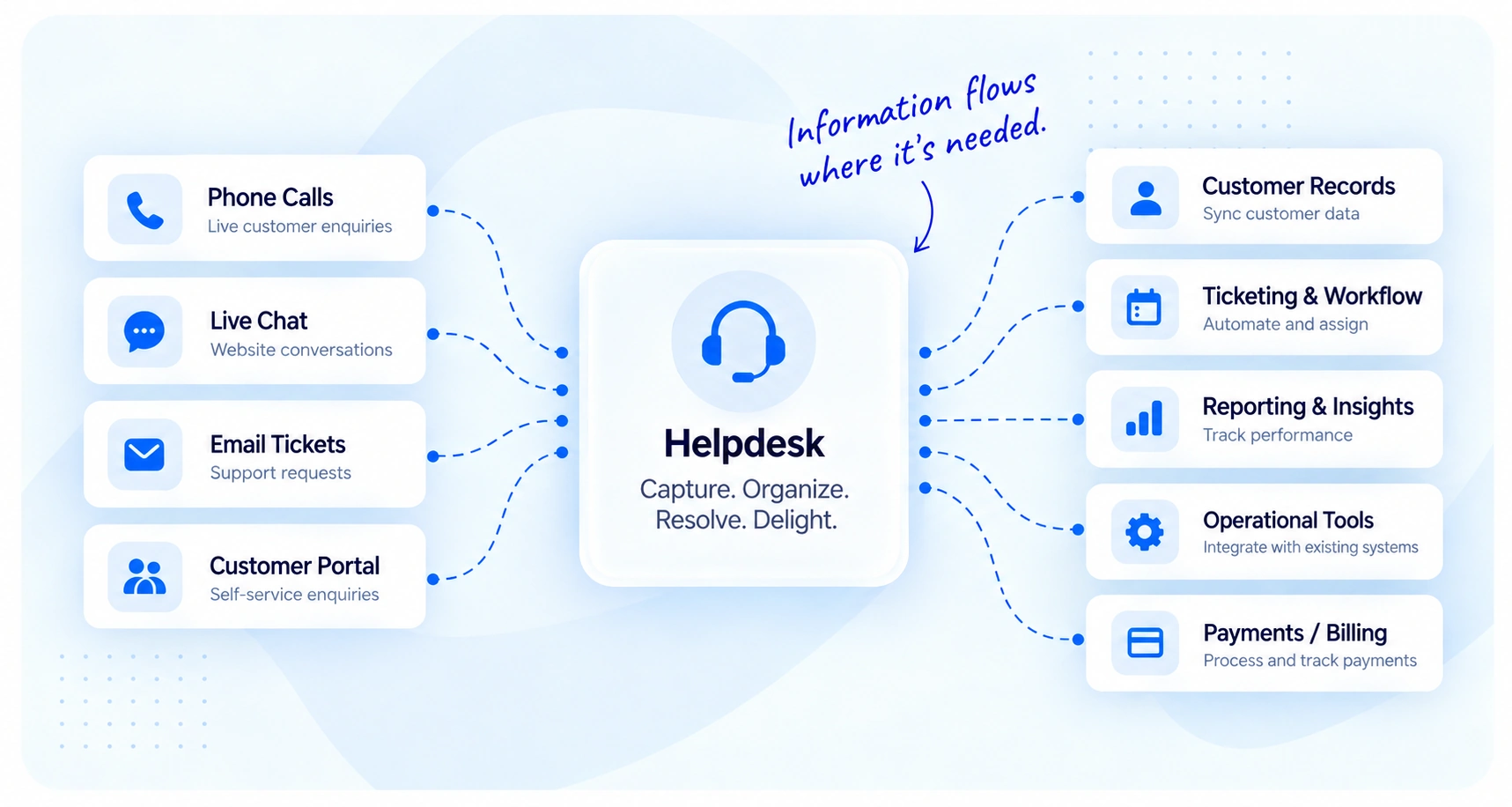
CONNECTED SUPPORT WORKFLOW

Keep The Context Attached To The Ticket That Needs It.

Bring support email, approved knowledge, store context and appointment availability into the Helpdesk so agents and AI can work from a more complete view of the customer.
GOC AI Helpdesk integration diagram showing phone calls, live chat, email tickets, and customer portal enquiries flowing into the helpdesk, then connecting to customer records, ticketing workflows, reporting, operational tools, and billing systems.

HELPDESK CONNECTIONS

Connect The Systems Around Better Support.

Each connection strengthens a different part of the support workflow — from receiving the ticket to understanding the customer, preparing the reply and deciding what happens next.

Email Inbox Connections

Connect real support mailboxes so incoming messages become tickets and replies return through the appropriate address.

Store & Order Data

Bring supported commerce information into the ticket so agents can work with customer and order context.

Calendar & Appointments

Use configured availability and appointment settings where the support workflow needs a scheduled next step.

Website Knowledge Import

Bring approved policy, FAQ and business information from existing website pages into the Helpdesk knowledge workflow.

AI + Review Controls

Connect the configured AI service to approved knowledge while keeping review thresholds and human approval visible.

Sales Assist

Use connected store information to support relevant product recommendations where Sales Assist is enabled.

SUPPORT EMAIL

Bring The Support Mailbox Into The Shared Inbox.

Connect a real support address over the configured incoming and outgoing mail settings so customer emails become Helpdesk tickets and replies return from the same support identity.
EM Support Email
Configuration Required
Mailbox

Support address

Brand Customer Support
Incoming mail IMAP
Outgoing mail SMTP
Ticket Flow

Email becomes a support ticket

Customer message Received
Support address Matched
Brand context Applied
Shared inbox Ready
Incoming mail selected — new customer messages can enter the shared Helpdesk queue.
OR Store & Order Data
Supported Store Required
Customer Question

Where is my order?

AC

Alex Carter

Existing customer
Can you tell me where my latest order is?
Order view selected — surface the relevant order inside the ticket.
Order Context

Connected store data

Order #10482
Status Available
Customer Matched
Ticket context Attached
Order context is available beside the customer conversation.

STORE & ORDER DATA

Give The Ticket Real Order Context.

Connect the supported store to surface relevant order information inside the customer conversation, helping agents answer order questions without leaving the ticket.

CALENDAR & APPOINTMENTS

Turn The Next Step Into A Clear Appointment.

Use the configured calendar and appointment setup when a support conversation needs to move toward a scheduled customer action.
CA Calendar & Appointments
Provider Dependent
Appointment Setup

Choose a useful next step

Duration 30 minutes
Confirmation Required
Availability Configured
Tuesday · 10:00 AM selected — ready for confirmation.
Ticket Outcome

Conversation → appointment

Customer Sarah Mitchell
Reason Follow-up call
Appointment Prepared
Ticket next step Confirm
Appointment-provider availability depends on the configured Helpdesk environment.
KB Website Knowledge
Approval Controlled
Knowledge Source

Bring an existing page into review

Source Website Page
Page type Policy / FAQ
Import selected — fetch the website content into the Helpdesk knowledge workflow.
Knowledge Article

Trusted support information

Returns policy Approved
Shipping policy Approved
Warranty guidance Review
Only approved knowledge should be used as trusted reply context.

WEBSITE KNOWLEDGE

Bring Trusted Website Content Into The Knowledge Base.

Import useful policy or FAQ content from an existing website page, review it and approve it before it becomes trusted knowledge for AI-assisted support.

AI + HUMAN REVIEW

Connect AI Without Removing Human Control.

Use the configured AI service with brand-specific knowledge, confidence thresholds and review rules so automation can help without silently taking responsibility away from the team.
AI AI + Review Control
Configured Service
AI Mode

Choose how AI participates

Assist mode — AI helps when an agent asks, while a person remains responsible for sending.
Governance

Keep the controls visible

Approved knowledge Required
Confidence Evaluated
Human review When Needed
Audit context Retained
AI assistance stays connected to knowledge, confidence and review rules.
SA Sales Assist
Store Connection Required
Customer Context

Support question with purchase intent

I already use this product. Is there another option that would fit what I need?
Product context selected — use connected store information relevant to the conversation.
Sales Assist Result

Support stays useful first

Store context Available
Recommendation Relevant only
Listed price Store context
Activity Trackable
The recommendation remains part of the customer-support conversation.

SALES ASSIST

Let Store Context Support A Relevant Recommendation.

When Sales Assist is enabled with a connected store, product and pricing context can support relevant recommendations inside customer replies.

CONTROLLED CONNECTION WORKFLOW

Keep The Context Useful. Keep People In Control.

Connect the source, confirm that it works, bring the relevant context into the ticket and keep human oversight where the support workflow needs it.
Connect Add the supported source
to the Helpdesk.
Test Confirm the connection
and expected data.
Enrich Bring useful context
into the ticket.
Review Keep people, audit and
quality controls involved.

Insights

Ideas for clearer growth decisions.

Explore the SaaS platforms, developer infrastructure and delivery products created by Geeks of Cybernet.

Strategy

The five signals that tell you a growth system needs attention.

Purpose-built applications and workflows shaped around the business.

Search

Visibility is a business problem before it is a rankings problem.

Purpose-built applications and workflows shaped around the business.

Responsible AI

Where automation helps—and where a person should stay involved.

Purpose-built applications and workflows shaped around the business.

CONNECTED CUSTOMER SUPPORT

Give Every Ticket More Useful Context.

Connect the systems that strengthen the support conversation, keep trusted information close to the ticket and let people stay in control of the outcome.